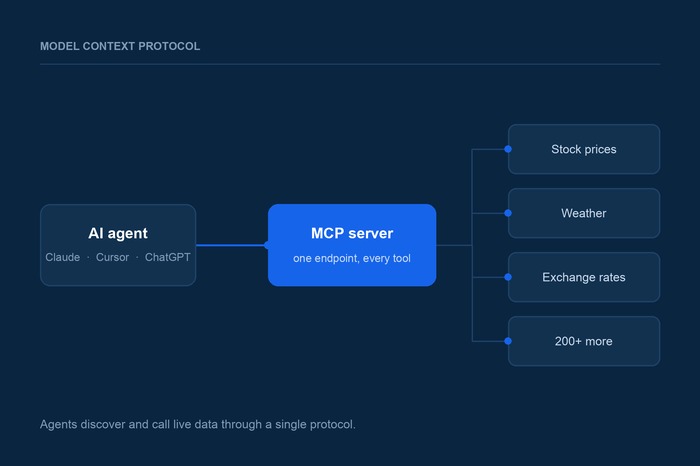
Ask a language model what Apple's stock is trading at right now and you will get one of two answers: a confident number that was true sometime before its training cutoff, or a polite refusal. Neither is useful. The model is not broken — it simply has no way to look anything up. Everything it knows was frozen the day training ended.
That gap between what a model can reason about and what it can actually observe is the single biggest constraint on AI agents. An agent that can write a beautiful trading analysis but cannot fetch today's prices is a very expensive autocomplete. The fix is to give the model a way to call the outside world, and over the past two years the industry has converged on one standard for doing it: the Model Context Protocol, or MCP.
This post covers what MCP is, why it won, how to connect an agent to live data with it, and the failure modes that tend to surface only after you ship.
The problem MCP solves
Function calling — letting a model emit a structured request that your code executes — has been around since 2023, and it works. The trouble was never the concept. It was that every framework invented its own way to describe a tool, and every integration had to be written from scratch for each pairing.
If you had five agent applications and twenty data sources you wanted them to reach, you were on the hook for a hundred bespoke integrations. Each one had its own schema format, its own auth handling, its own error conventions. Swap out your agent framework and you rewrote all twenty. This is the classic N-by-M integration problem, and it is exactly the problem that USB, ODBC, and the Language Server Protocol each solved in their own domains — by inserting a standard in the middle so that N plus M integrations replace N times M.
MCP is that standard for AI agents. Anthropic released it as an open protocol in November 2024, and adoption moved unusually fast: OpenAI, Google, and Microsoft all shipped support during 2025, and in December 2025 Anthropic donated the protocol to the newly formed Agentic AI Foundation, a directed fund under the Linux Foundation, with OpenAI, Google, Microsoft, AWS, Cloudflare, and Bloomberg among its backers. By the end of its first year MCP was seeing roughly 97 million monthly SDK downloads across more than 10,000 active servers.
The practical consequence for you as a developer is simple. Write one MCP server and every compliant client can use it — Claude, ChatGPT, Cursor, VS Code, Gemini CLI, and the agent framework you have not adopted yet. Conversely, if you are building an agent, every MCP server that already exists is a capability you get without writing an integration.
What MCP actually is
Strip away the branding and MCP is a JSON-RPC protocol with a defined vocabulary for three things a model might need from the outside world.
Tools are actions the model can invoke: fetch a stock quote, look up a WHOIS record, convert a currency. Each tool advertises a name, a description, and a JSON Schema for its inputs, which is what lets the model figure out on its own when and how to call it. This is the primitive most people mean when they say MCP.
Resources are read-only context the client can pull in and hand to the model — a file, a database row, a document. Where tools are verbs, resources are nouns. The distinction matters because resources are generally application-controlled (your app decides what to include) while tools are model-controlled (the model decides when to call them).
Prompts are reusable templates a server can expose, typically surfaced in a client as a slash command or a menu item. They are the least used of the three, but they are how a server author can package a known-good workflow rather than hoping each user reinvents it.
A server can implement any combination. Most data-oriented servers, including ours, are almost entirely tools.
Local servers and remote servers
MCP servers run in one of two places, and the choice determines almost everything about how you deploy and secure them.
Local servers run as a subprocess on the same machine as the client and communicate over stdio. The client launches the process, they talk over standard input and output, and nothing touches the network. This is ideal for anything that needs access to local state — your filesystem, a local database, a git repository, a Docker daemon. It is also the easier model to reason about for security, since there is no listening port and the server inherits the trust boundary of the machine it runs on.
Remote servers are reached over HTTP using the Streamable HTTP transport, and this is how any hosted service will expose itself. A remote server is just a web service that speaks MCP: you point your client at a URL, pass credentials, and the tools show up. This is the right model for data APIs, SaaS platforms, and anything multi-tenant, because one deployment serves every user and you can update the tool catalog without asking anyone to upgrade anything.
One historical note worth knowing if you are reading older tutorials: the original remote transport was based on Server-Sent Events with two separate endpoints. It has been superseded by Streamable HTTP, which uses a single endpoint and only upgrades to a stream when a response actually needs one. If a client config you find online mentions an /sse endpoint or a transport named sse, it is out of date.
Connecting an agent to live data
The fastest way to understand MCP is to wire one up. We host a public MCP server at https://mcp.api-ninjas.com/mcp that exposes every endpoint in the API Ninjas catalog — 213 tools covering stock prices, earnings transcripts, weather, currency conversion, WHOIS, geocoding, and the rest — so the examples below are runnable rather than illustrative.
That full catalog is more than most agents need, so the same server also answers on narrower URLs: /mcp/finance, /mcp/banking, /mcp/geo, /mcp/dates, /mcp/tax, /mcp/vehicles, /mcp/health, /mcp/text, /mcp/media and /mcp/fun. Everything else stays identical — same key, same transport, same configuration — and only the subset of tools changes. The reason that matters is the subject of a later section; for now, substitute whichever URL fits your agent into the examples below.
For a command-line agent like Claude Code, connecting is one command:
claude mcp add --transport http apininjas https://mcp.api-ninjas.com/mcp \
  --header "X-Api-Key: YOUR_API_NINJAS_KEY"
For clients configured through a JSON file — Cursor, VS Code, Claude Desktop, Windsurf and most editors — the shape is the same idea expressed as config:
{
  "mcpServers": {
    "apininjas": {
      "type": "http",
      "url": "https://mcp.api-ninjas.com/mcp",
      "headers": {
        "X-Api-Key": "YOUR_API_NINJAS_KEY"
      }
    }
  }
}
And if you are building an agent yourself rather than configuring someone else's, every major framework has an MCP client. In LangChain:
from langchain_mcp_adapters.client import MultiServerMCPClient

client = MultiServerMCPClient({
    "apininjas": {
        "transport": "streamable_http",
        "url": "https://mcp.api-ninjas.com/mcp",
        "headers": {"X-Api-Key": "YOUR_API_NINJAS_KEY"},
    }
})
tools = await client.get_tools()
Or with the Vercel AI SDK in TypeScript:
import { experimental_createMCPClient as createMCPClient } from 'ai';

const mcp = await createMCPClient({
  transport: {
    type: 'http',
    url: 'https://mcp.api-ninjas.com/mcp',
    headers: { 'X-Api-Key': 'YOUR_API_NINJAS_KEY' },
  },
});

const tools = await mcp.tools();
In every case the payoff is the same: you never wrote a single tool definition. The server publishes its own catalog, the client fetches it at connection time, and the model reads the descriptions and decides what to call. Ask your agent what gold closed at, and it finds the commodity price tool, calls it, and answers from live data. Add an endpoint to the server tomorrow and every connected agent picks it up without a config change.
Note the authentication header. Because clients vary in what their UI allows, our server accepts the same key three ways — an X-Api-Key header, an Authorization: Bearer header, or an ?apikey= query parameter for connectors like ChatGPT that offer no header field at all. If you build a remote server of your own, plan for this variance early; it is the most common reason a server that works in one client silently fails in another.
What changed in the 2026 specification
MCP is a living standard, and the specification published on July 28, 2026 is the most consequential revision so far for anyone operating a remote server.
The headline change is that the protocol core became stateless. Earlier versions maintained a protocol-level session identified by an Mcp-Session-Id header, which meant a client's requests had to keep landing on the server instance that held its session. That is a genuine operational burden — it forces sticky sessions, complicates autoscaling, and makes a rolling deploy user-visible. Removing it means any instance behind an ordinary load balancer can answer any request, so an MCP server can now be deployed like any other stateless web service.
The revision also added Mcp-Method and Mcp-Name headers, which put the operation being invoked into the request headers rather than burying it in the JSON-RPC body. That sounds like a detail until you run one of these in production: it lets gateways, rate limiters, and load balancers route and meter on the operation without parsing request bodies. Servers reject requests where the headers and the body disagree, so the headers cannot be used to smuggle anything past a proxy. Rounding out the release are cacheable list results, multi round-trip requests, hardened authorization rules, and a formal extensions framework for capabilities that are not part of the core spec.
Four things that go wrong
MCP is easy to demo and somewhat harder to run well. These are the problems that reliably show up once real usage starts.
Too many tools poisons the context. Every connected tool's name, description, and input schema is injected into the model's context on every request. Connect six servers with fifty tools each and you have spent a substantial share of your context window before the user has said anything, and accuracy degrades as the model picks among near-identical options. Connect only the servers a given agent actually needs, and if your client supports filtering the tool list, use it.
The numbers are larger than people expect. Our own catalog of 213 tools serialises to roughly 47,000 tokens of definitions — a real cost the customer pays on every connection, before answering a single question. That is why we split the server by domain: an agent that only validates bank details can connect to /mcp/banking and carry 24 tools and about 4,000 tokens instead. GitHub reported a similar result from the other direction, trimming the built-in toolset in VS Code from 40 tools to 13 and measuring both better task success and lower latency. If you publish a server, publishing narrower entry points alongside the full one is cheap and your users feel it immediately; if you consume one, check whether the vendor already offers them.
Tool descriptions are prompt engineering. The model chooses tools by reading their descriptions, so a vague description is a bug. "Gets data about a company" will be called at the wrong times and skipped at the right ones. Say what the tool returns, what the arguments mean, what units come back, and when it should be preferred over a similar tool. If an agent keeps picking the wrong tool, fix the description before you touch the model.
Untrusted servers are a real attack surface. A tool description is text that goes into your model's context, which makes a malicious server a prompt injection vector — and a tool result is data returned by a third party that your agent may then act on. Treat installing an MCP server with the same care as installing a dependency: prefer first-party servers from the vendor whose data you are actually using, read what you are connecting to, and be deliberate about which tools you allow to run without confirmation.
Agents call APIs differently than humans do. A person writes one query and reads the result. An agent may call the same endpoint fifteen times in a loop while it reasons, which turns quota planning into a different exercise and makes rate limit errors a routine control-flow event rather than an exception. Return errors an agent can act on — say which parameter was wrong and what a valid value looks like — because a model that receives a useful error will usually correct itself, while one that receives 400 Bad Request will simply try again identically.
APIs are getting a second audience
The deeper shift here is not technical, it is about who your API is for. For twenty years the consumer of an API was a developer who read your documentation, wrote an integration, and shipped it. That developer is still there. But increasingly the caller is an agent that discovered your endpoint at runtime, read a schema instead of a tutorial, and decided on its own to invoke it.
That audience has different requirements. It cannot email support. It does not read a migration guide. It has no patience for an endpoint whose behavior contradicts its description. What it needs is accurate schemas, honest descriptions, predictable errors, and stable semantics — which, conveniently, is what human developers have always wanted and rarely got.
Connect your agent in one line
If you are building for agents, the practical starting point is to stop writing integrations and start connecting servers. Our MCP server exposes the full API Ninjas catalog to any compliant client in a single line of configuration, and it is available on every plan, including the free tier. If you would rather call the endpoints directly, all of them are documented in our API catalog and work exactly as they always have — the protocol is new, the data is the same.
Explore API integration use cases for recommended APIs and workflow examples.